Can You Trade or Gift Valorant Skins? The Rules, and Why Buying an Account With Skins Backfires

No. Valorant skins can't be traded, sold or moved off the account that owns them; the one exception is gifting, which is a fresh store purchase you pay for and send to a friend. So where can you buy a Valorant account with skins? Nowhere Riot allows: its Terms of Service forbid selling or transferring an account, and a bought account can be pulled back by the seller, stripped by a chargeback or banned. That is the rulebook as we read it on 13 Oct 2026.
This page is for two kinds of reader. If you want to give a friend a skin, the gifting rules and steps are below and take five minutes. If you were about to pay a stranger for a stacked account, read the section on how those accounts get taken back first, then the legitimate routes to the same skins. We link no account sellers, and never will.
Can you trade or gift skins? The short answer
Trading means moving something you already own to someone else. Valorant has no mechanism for that: no marketplace, no trade window, no way to hand over a skin from your Collection. Riot's Terms put it in plain words: you have "no ownership in any of the Virtual Content you unlock and you can't transfer it to someone else." The same section says Virtual Content "has no monetary value", which is why there's no cash-out either.
Gifting is different because nothing leaves your inventory. You buy an item that is in the store right now, choose a friend, and the item lands in their Collection instead of yours. The table sorts every way people try to move skins into what works and what doesn't.
| # | What you want to send | Allowed? | How |
|---|---|---|---|
| #1 | A current featured-store bundle | Yes | Gift it as a new purchase |
| #2 | One item from a current featured bundle | Yes | Gift that item on its own |
| #3 | An Esports store capsule | Yes | Gift it as-is, no single items |
| #4 | VP | Yes, PC only | Gift a new VP purchase; not from your balance |
| #5 | A skin you already own | No | Owned content can't be transferred |
| #6 | Night Market offers, older skins | Not on Riot's list | Only featured, Esports and VP are giftable |
| #7 | A whole account with skins | No | Banned by Terms of Service §1.5 |
What Riot allows: gifting, step by step
Gifting arrived in patch 10.08 on 29 April 2025, and it has widened in stages since. Riot's support page, read today, lists three things you can buy for a friend: featured store bundles, individual items within those bundles, and Esports bundles, which go as a whole. If the friend already owns part of a bundle, the price drops so you pay only for the pieces they don't have.
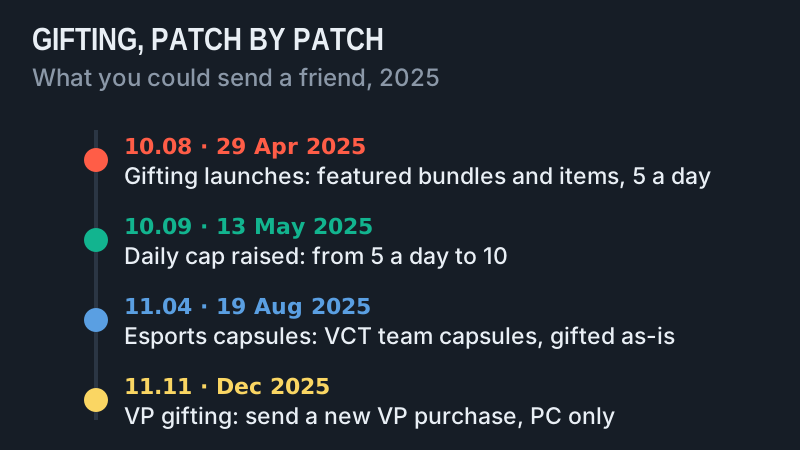
The sender carries most of the conditions. As of 13 Oct 2026:
- The gifter's account must be at least level 15.
- You and the recipient must have been friends for at least one week.
- Neither account can be serving a long or permanent ban.
- Both players must be on the same game shard (NA, LATAM, BR, EU, KR or AP).
- You can send up to ten gifts a day; the cap began at five.
- You can't gift something the recipient already owns, or send VP out of your existing balance.
Some countries are fenced in further. Players in the Philippines, Indonesia, Thailand and Vietnam can gift only among those four countries, and Turkey, Russia, Ukraine, Iran and Egypt are gift-within-the-country only, per Riot's page. The steps are the same everywhere: open the Store, pick the item in the Featured Store Bundles or Esports tab, press GIFT, choose a recipient, choose the item, confirm the price and purchase.
After that the choice is your friend's. Accept, and the item is theirs for good. Reject, and the VP goes back to you. Ignore it for 60 days, and the purchase refunds itself to the sender. Once a bundle gift is accepted it can't be refunded, unless local law requires it; a VP gift may be, through a support ticket. One catch for anyone planning a refund elsewhere on the account: Riot's refund policy says a pending gift blocks all refunds until it's claimed or rejected.
Buying an account with skins: what the Terms say
The search behind this page, where can I buy a Valorant account with skins, has a one-line answer in Riot's Terms of Service (last modified 1 December 2024). Section 1.5 is titled "Can I share or sell my account or login credentials?" and answers "No." Its rule is that you "can't sell, transfer or allow any other person to access your account or Login Credentials, or offer to do so." The offer alone breaks it, which covers the seller's listing as much as the sale.
Two more clauses make the purchase worthless even before anyone notices it. Section 4.4 says you have "no ownership or other property interest in your account", and that all rights in it belong to Riot. Section 4.3 says the skins are a "non-transferable limited license", not goods. So what a seller offers is login details for something neither of you owns. Section 2.1.2 lets Riot suspend or terminate an account for any breach of the Terms, and section 2.3 adds that a termination for cause comes without refunds, along with the right to close the other accounts you hold.
How bought accounts get taken back
People who've lost a bought account usually blame bad luck. In practice there are three routes back to nothing, and every one of them is described on Riot's own pages. None needs Riot to catch the sale first.
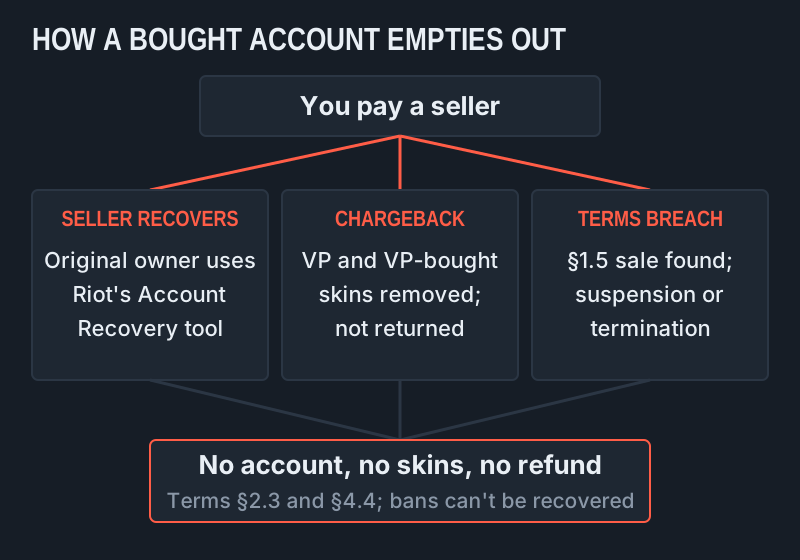
The seller recovers it. The seller usually still has the email the account was registered with, and Riot's Account Recovery Tool exists to hand a "compromised account" back to its owner. From Riot's side, a sold account in a stranger's hands looks just like a compromised one. The seller gets paid, recovers the login, and can sell it again.
A chargeback strips the skins. If any VP behind those skins was paid for with a card that is later disputed, or one that wasn't the seller's to use, the payment gets reversed. When it is, Riot's VALORANT chargeback policy, in force for chargebacks after 4 June 2024, recovers the balance automatically from current VP and from content bought with VP, weapon skins and agents included. Content removed that way isn't returned even after the balance is repaid. If the balance stays negative, the account can still play but can't buy anything until it's topped back up.
A ban ends it. If Riot links the account to a sale, the Terms allow suspension or termination, and Riot's recovery page is blunt about the end state: permanently banned accounts cannot be recovered. You then have no account, no skins and no claim, because the Terms say you never owned either.
There's also the risk before any of that: the account may never arrive. A seller who takes payment off-platform and goes quiet leaves you with nothing to report to Riot, because the deal itself broke the Terms.
Legit ways to get the skins instead
The legitimate routes are slower than a bought account, but every skin they give you stays yours to use.
Buy them yourself, at the store price. Every featured-store skin has a fixed VP price by edition, and our Valorant weapon skins catalogue lists what each one costs, dated. If you top up with prepaid VP codes rather than a card, Valorant Points cards on Eneba are one option; check the region printed on the listing against your account's before you buy.
Wait for the Night Market or a returning bundle. Skins that left the store come back through daily offers, the Night Market's discounts and re-run bundles. Our Night Market explainer covers how its discounts work and how often it runs.
Ask for a gift. A friend at level 15 or above, after a week on each other's friends list, can buy you anything in the current featured bundle. For a birthday or a shared win, that is the only sanctioned way a skin changes hands.
Collect the free ones. Battle pass tiers, events and promotions hand out free cosmetics; our free Valorant skins guide sorts the real routes from the generator scams.
Edge cases
A few situations sit between the rules. Sharing your own login with a friend so they can "use your skins" is a breach of the same section 1.5, even when no money changes hands; the safe version is gifting. If your account was sold or shared without your permission, for example by a sibling, the recovery tool and a support ticket are the official route, and Riot's recovery page asks you to report any purchases you didn't make.
A chargeback on a gift hits both sides: under Riot's VALORANT chargeback policy, the sender and the recipient both have gifting suspended. Moving region is not a loophole either; changing your region of residence doesn't create a way to move skins between accounts. And anything sold as a "skin transfer service" is a request for your login, which section 1.5 forbids you to give.
Frequently asked questions
Can you gift skins in Valorant?
Yes. Since patch 10.08 in April 2025 you can buy a current featured-store bundle, one item from it, or an Esports capsule for a friend. You must be level 15, friends for a week and on the same shard, with up to ten gifts a day.
Can you trade Valorant skins?
No. There is no trading, marketplace or transfer of owned skins; Riot's Terms say Virtual Content can't be transferred and has no monetary value. Gifting is a new purchase, not a trade, as of 13 Oct 2026.
Where can I buy a Valorant account with skins?
Nowhere that's allowed. Section 1.5 of Riot's Terms bans selling, transferring or offering an account, and a bought account can be recovered by the seller, emptied by a chargeback or banned. We don't link sellers.
Can you get banned for buying a Valorant account?
Yes. Buying breaches section 1.5 of Riot's Terms, and section 2.1.2 lets Riot suspend or terminate the account. Riot's recovery page says permanently banned accounts can't be recovered, and section 2.3 rules out refunds.
Can you transfer Valorant skins to another account?
No. Skins stay on the account that unlocked them, even between your own accounts. Gifting a fresh purchase from the current featured store is the only way to put a skin on someone else's account.
See every weapon and edition, with dated VP prices, in the Valorant skin catalog.